On-Device LLM Inference on Android using GenieX
What is GenieX
GenieX is an on-device generative AI inference runtime built for Qualcomm Snapdragon platforms. It is the community edition of Qualcomm’s GENIE platform, designed to run frontier language models and vision-language models locally on-device — without any cloud dependency.
GenieX exposes five integration interfaces over a common inference foundation:
Android SDK — Kotlin/Java library distributed via Maven Central
Python SDK — Embeddable inference in Python applications
CLI — Terminal-based model execution
Docker — Containerised deployment for edge Linux targets
OpenAI-compatible server — Local HTTP server with OpenAI-style API
This article covers the Android SDK path.
Note
GenieX is currently in developer preview. Interfaces are subject to change in future releases. Community feedback can be submitted via the project’s GitHub Issues or Slack channel.
Architecture
GenieX is structured as a layered system. At the top, developer-facing interfaces (Android SDK, Python, CLI, Docker, OpenAI server) receive inference requests and route them through a unified runtime layer. That runtime layer selects between two underlying execution backends based on the model type and configured compute unit.
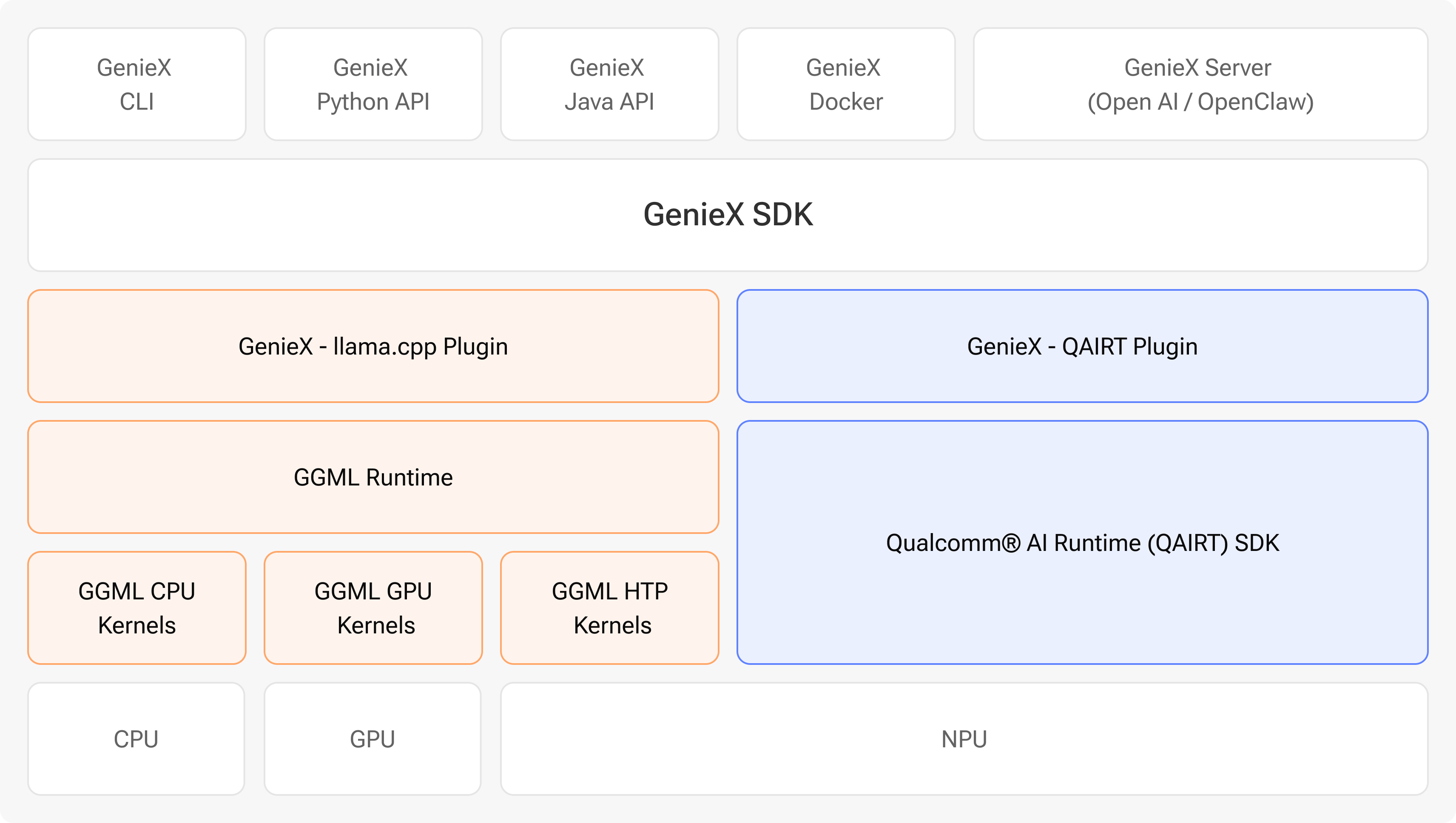
The two backends — llama_cpp and qairt — each map to a distinct model ecosystem and set
of supported compute units, as described in the following sections.
Why Two Runtimes
A single inference runtime cannot simultaneously serve the breadth of the open-source model ecosystem and the depth of hardware-specific NPU optimisation. GenieX addresses this with a dual-runtime architecture:
- llama.cpp runtime
Executes community GGUF models using GGML kernels. It supports execution on the Hexagon NPU, Adreno GPU, and CPU, enabling broad compatibility with models published on Hugging Face and other community repositories. This runtime provides flexibility across compute units and model sources.
- Qualcomm AI Engine Direct (qairt)
Executes pre-compiled model bundles sourced from Qualcomm AI Hub. These bundles are chipset-specific compilations that run exclusively on the Hexagon NPU. The quantization strategy, context length, and KV cache layout are fixed at compile time, enabling predictable and hardware-optimised inference.
Together, the two runtimes provide both broad model coverage (llama.cpp) and hardware-specific NPU execution (qairt), without requiring the developer to operate two separate SDKs.
Runtime Selection Guide
The appropriate runtime depends on the model source, the required compute flexibility, and the target hardware.
Criterion |
llama.cpp |
Qualcomm AI Engine Direct |
|---|---|---|
Model format |
GGUF (any community model) |
Qualcomm AI Hub pre-compiled bundles |
Compute units |
NPU / GPU / CPU |
NPU only |
Precisions (Quantizations) picked by |
You (Q4_0, Q8_0, F16, …) |
Pre-quantized in the bundle |
NPU quantization for llama.cpp |
Q4_0 provides the broadest Hexagon NPU kernel coverage |
Not applicable |
Context length / KV cache |
Configurable via |
Pre-determined in the bundle; do not override |
VLM support |
Requires |
Supported where available on AI Hub |
Best for |
Bringing your own GGUF from Hugging Face |
Highest NPU performance on Qualcomm® AI Hub Models |
When runtime_id is not specified, GenieX automatically selects the backend based on the
downloaded model’s metadata.
Supported Models on Android
GenieX on Android supports both LLM (text-only) and VLM (vision + text) model types across both runtimes.
llama_cpp — Quantization Support
Quantization |
Compute |
Notes |
|---|---|---|
|
NPU, GPU, CPU |
Broadest Hexagon NPU kernel coverage in llama.cpp; recommended for NPU execution |
|
GPU, CPU |
Higher accuracy than Q4_0; no NPU support |
|
GPU, CPU |
Full precision; no NPU support |
|
GPU, CPU |
Mixed-precision K-quants; no NPU support |
qairt — Quantization Support
Quantization |
Compute |
Notes |
|---|---|---|
|
NPU |
Weights int4, activations int16; most common AI Hub bundle type |
|
NPU |
Weights int4, activations float; marginally higher accuracy than w4a16 |
Deploying with GenieX Chat Android
GenieX Chat Android is a validated reference application from Qualcomm that demonstrates on-device LLM and VLM inference using the GenieX SDK. Model weights are not bundled into the APK. Instead, the application provides an in-app model catalog from which models are downloaded directly to the device and loaded onto the NPU — no manual file transfer or ADB push is required.
Prerequisites
Android Studio 2024.3.1 or newer
A Snapdragon 8 Elite (SM8750) or Snapdragon 8 Elite Gen 5 (SM8850) device
USB debugging enabled on the target device
Step 1 — Build the APK
Open the
geniex_chat_androidfolder in Android Studio.Select File → Sync Project with Gradle Files and wait for the sync to complete. The GenieX SDK dependency (
com.qualcomm.qti:geniex-android) resolves automatically from Maven Central — no additional SDK setup is required.Navigate to Build → Build Bundle(s) / APK(s) → Build APK(s).
The signed debug APK is output to:
build/outputs/apk/debug/app-debug.apk
Step 2 — Install on Device
With the device connected via USB:
adb install -t build/outputs/apk/debug/app-debug.apk
Step 3 — Select, Download, and Run a Model
Launch the application from the device launcher. The in-app catalog lists all supported models. Select a model to initiate the download directly to the device — no manual file transfer is required. Once the download completes, tap the model entry in the UI to load it, then enter a prompt in the chat interface and submit it to run inference on the Hexagon NPU.
Note
Model files range from under 1 GB to several gigabytes. Ensure sufficient free storage is available on the device before initiating a download.
Supported Models in GenieX Chat Android
The following models are available directly from the in-app catalog. All models run on the Hexagon NPU. LLM models support text input; VLM models additionally accept image input.
LLM Models
Model |
Runtime |
Compute |
|---|---|---|
Qwen3-0.6B |
llama_cpp |
NPU |
Qwen3-1.7B |
llama_cpp |
NPU |
Ministral-3B-Instruct |
llama_cpp |
NPU |
Granite-4.0-Micro |
llama_cpp |
NPU |
Phi-4-Mini-Instruct |
llama_cpp |
NPU |
Gemma 4 2B Instruct (QAT Q4_0) |
llama_cpp |
NPU |
Gemma 4 4B Instruct (QAT Q4_0) |
llama_cpp |
NPU |
Qwen3.5-0.8B |
llama_cpp |
NPU |
Qwen3.5-2B |
llama_cpp |
NPU |
GPT-OSS-20B |
llama_cpp |
NPU |
Qwen3-4B |
qairt |
NPU |
Qwen3-4B-Instruct |
qairt |
NPU |
VLM Models (Vision + Text)
Model |
Runtime |
Compute |
|---|---|---|
Qwen3-VL-2B-Instruct |
llama_cpp |
NPU |
Qwen3-VL-4B-Instruct |
llama_cpp |
NPU |
Qwen2.5-VL-7B-Instruct |
qairt |
NPU |