Model Onboarding
Model Onboarding Workflow
Taking a neural network from a standard framework (like PyTorch or TensorFlow or ONNX) to highly optimized execution on Snapdragon silicon requires a structured, multi-step pipeline. This workflow ensures that hardware constraints are met, accuracy is preserved, and maximum performance is extracted.
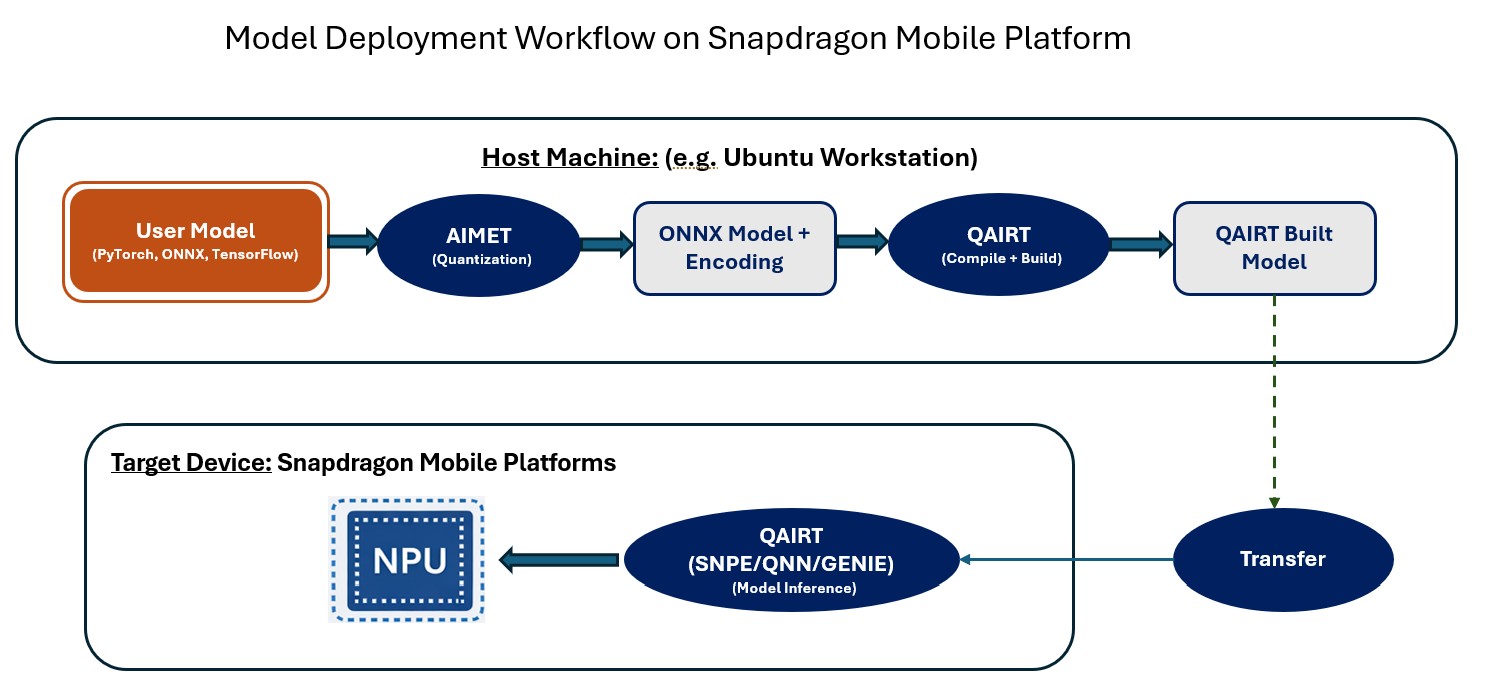
Step 1: Architecture Feasibility & Model Selection
Before any conversion begins, developers must verify that the model’s architecture is compatible with the target hardware (especially the Hexagon Tensor Processor, or HTP). This step identifies unsupported operators, excessive memory footprints (VTCM limits), and activation growth. Catching these issues early prevents wasted engineering effort later in the deployment cycle.
Category |
Ecosystem |
Tool / API |
Description |
|---|---|---|---|
Architecture Feasibility & Validation |
QNN |
|
Verifies architecture, layer mix, tensor shapes, and memory limits. |
AIMET |
|
Provides topology analysis guidance directly in PyTorch before deployment optimization begins. |
|
SNPE |
|
Checks platform readiness and validates models specifically for SNPE. |
|
GENIE |
|
Stress tests Genie and LLM/GenAI workflows for hardware constraints. |
Step 2: Model Conversion & Custom Op Enablement
Standard framework models (PyTorch, TensorFlow, ONNX) must be translated into Qualcomm-compatible artifacts. If the model contains layers that are not natively supported, developers package them as Custom Operations (User Defined Operations (UDOs)) or Layer Replacement.
Category |
Ecosystem |
Tool / API |
Description |
|---|---|---|---|
Conversion |
QNN |
|
Translates ONNX and TensorFlow framework graphs into QNN artifacts. |
SNPE |
|
Translates framework graphs into SNPE’s unified DLC format. |
|
Custom Ops |
QNN |
|
Generates packages for unsupported layers, allowing custom ops in QNN. |
SNPE |
|
Generates User Defined Operation (UDO) packages for SNPE. |
|
Build Flow |
GENIE |
|
Executes build flow for Genie models, inheriting QNN package generation. |
Corrected QIDK references for this step
Step 3: Quantization, Accuracy Analysis and Recovery
To maximize throughput and minimize power consumption on the HTP, models are typically quantized from high-precision floating-point (FP32) to low-precision integer formats (INT8/INT16). Because quantization can cause accuracy degradation, this step relies heavily on debugging and evaluation tools to localize the error. If standard Post-Training Quantization (PTQ) fails, developers utilize AIMET for Quantization-Aware Training (QAT) or apply mixed-precision strategies to keep sensitive layers in higher precision.
Stage 1: Float Baseline Validation
Before applying any quantization, it is critical to ensure the model’s accuracy is solid when running in its native training framework (e.g., TensorFlow or PyTorch float mode). Run the unquantized floating-point model via the CPU runtime to ensure the initial conversion to the Qualcomm format hasn’t inherently broken the graph before any quantization is applied.
Category |
Ecosystem |
Tool / API |
Description |
|---|---|---|---|
Float Baseline |
SNPE |
|
Runs the unquantized float DLC on the CPU runtime to validate the graph. |
QNN |
|
Runs the unquantized model on the CPU backend for baseline validation. |
Stage 2: Post-Training Quantization (PTQ)
In this stage, a standard, automated Post-Training Quantization is applied. The model is run through a conversion tool along with a small subset of the training dataset (calibration data) to find base encoding values and convert the model from FP32 to an integer format (like INT8 or INT16).
Category |
Ecosystem |
Tool / API |
Description |
|---|---|---|---|
PTQ |
SNPE |
|
Applies standard Post-Training Quantization to convert the model to INT8. |
QNN |
|
Applies standard Post-Training Quantization to convert the model to INT8. |
|
QAIRT |
|
Converts and quantizes models automatically for QNN/QAIRT workflows. |
AIMET Documentation: - Documentation Link
Stage 3: Accuracy Evaluation & Error Isolation (Layer-by-Layer Debugging)
If the overall task accuracy or KPI is unacceptable after Stage 2, developer can compare the outputs of the Float model against the Quantized model layer-by-layer. Tools compute metrics like Cosine Similarity (CS), Mean Average Error (MAE), and Signal-to-Quantization-Noise Ratio (SQNR).
CS < 0.9: Typically indicates a calculation/math error requiring a layer-by-layer check.
CS > 0.9 (but below golden reference): Usually indicates precision loss that needs to be fine-tuned via encodings.
Example for CS in QIDK references for this step
Debug flags are used to dump intermediate layer outputs and sequentially trace the graph to find the exact operator where the mathematical drift first occurs.
Category |
Ecosystem |
Tool / API |
Description |
|---|---|---|---|
Error Isolation |
QNN |
|
Identifies layer-wise accuracy drift and isolates math/precision errors. |
SNPE |
|
Identifies layer-wise accuracy drift in SNPE models. |
|
QAIRT |
|
Unified accuracy debugger for layer-by-layer QAIRT workflows. |
Stage 4: Automated Tuning & Sweeping
This action involves using inspector tools to test different quantization algorithms. Evaluators sweep through a matrix of different quantization strategies and policies to automatically rank the best encoding options for the model based on a supplied dataset.
Category |
Ecosystem |
Tool / API |
Description |
|---|---|---|---|
Evaluator |
QAIRT |
|
Unified accuracy evaluator for QAIRT workflows. |
Stage 5: Advanced Recovery (AIMET QAT & Mixed Precision)
If basic sweeping fails to recover the drop, the model requires advanced intervention using the AI Model Efficiency Toolkit (AIMET).
Mixed Precision: Identifying highly sensitive layers (like activation-heavy blocks) and leaving them in a higher precision format (e.g., INT16 or FP16) while keeping the rest of the graph in INT8.
Example for Mixed Precision in QIDK references for this step - QIDK mixed precision example
Quantization-Aware Training (QAT): The model is mathematically retrained in FP32 alongside simulated quantization noise. The AIMET encoding net calculates robust parameters for weights, activations, and biases.
AIMET Documentation: - Documentation Link
Category |
Ecosystem |
Tool / API |
Description |
|---|---|---|---|
AIMET Analysis |
AIMET |
|
Identifies precision-sensitive layers & quantifies accuracy degradation. |
Mixed Precision / QAT |
AIMET |
|
Automates PTQ and applies mixed precision to recover model accuracy. |
Parameter Override |
QNN/QAIRT |
|
Flag used to inject AIMET generated parameters into QNN/QAIRT tables. |
Parameter Override |
SNPE |
|
Flag used to inject AIMET generated parameters into SNPE DLC files. |
Step 4: Compilation and Context generation
To prevent the target application from having to perform expensive graph optimizations every time it starts up, the model is pre-compiled. This step generates target-specific libraries and serialized context binaries, locking in the hardware execution plan so the app can load and run the model almost instantly.
Category |
Ecosystem |
Tool / API |
Description |
|---|---|---|---|
Generation |
QNN |
|
Transforms converted graph into serialized, hardware-specific binaries. |
SNPE |
|
Pre-compiles graph to reduce device startup and application load times. |
Step 5: Performance profiling and simulation
Before deploying to physical hardware, developers run the compiled models on host-based x86 simulators. This allows them to generate detailed execution profiles, trace operations, verify memory usage, and estimate latency or throughput expectations.
Category |
Ecosystem |
Tool / API |
Description |
|---|---|---|---|
Simulation |
QNN |
|
Executes models on host/device for verification and output dumping. |
SNPE |
|
Executes DLC models for verification, output dumping, and testing. |
|
GENIE |
|
Simulates text-to-text or text-to-image workflows on x86 environments. |
|
Profiler |
QNN |
|
Analyzes performance, profiles memory, and traces operation execution and helps to visualizes profiling data |
SNPE |
|
Visualizes the network structure and execution diagnostics for SNPE. |
|
QAIRT |
|
Unified visualizer for reviewing graph structure and performance metrics. |
Step 6: Runtime integration
Before pre-compiled artifacts are integrated into the actual software application, we can validate the output using execution tool on device.
Category |
Ecosystem |
Tool / API |
Description |
|---|---|---|---|
Execution |
QNN |
|
Executes integrated QNN components on device |
SNPE |
|
Executes integrated SNPE components on device |
|
GENIE |
|
Simulates text-to-text or text-to-image workflows on device |
Step 7: Validation and deployment
The compiled artifacts are embedded into the final C++ or Java application. Developers handle input/output buffer management and runtime library integration. Finally, the model is tested on physical silicon to validate end-to-end task accuracy, thermal stability, power consumption, and sustained concurrency under real-world conditions.
Category |
Ecosystem |
Tool / API |
Description |
|---|---|---|---|
Device APIs |
QNN |
|
Low-level APIs for fine-grained hardware control on Snapdragon targets. |
SNPE |
|
APIs for final device sign-off, integrating with Android/Linux apps. |
|
GENIE |
|
High-level APIs for executing GenAI pipelines on target silicon. |
|
QAIRT |
|
Unified interface simplifying integration across the hardware stack. |
Large Language Model (LLM) Onboarding
This guide outlines the stages and details required for onboarding a Large Language Model (LLM) into the AI Hub Models repository. You should follow this path if you want to:
Add a new Large Language Model.
Add device support for an existing LLM.
Add new performance data for an existing LLM.
LLM Onboarding Reference Documentation: Documentation